
Guides
Can ChatGPT build a website for your business?
Yes, ChatGPT Sites can build and host a website on Plus or Pro where available, including from a phone. Free and Go need separate hosting for code from a chat. SiteSpin builds your website, brings bookings, orders and messages into its app, and keeps it current through changes you describe.
By SiteSpin Published Last verified
Can ChatGPT build a website customers can use?
Yes, ChatGPT Sites can build, publish and host a website through a conversation on Plus or Pro where available, including from a phone. Free and Go do not include Sites, so code from a chat needs separate hosting before customers can visit. If you want your business website, bookings, orders, messages and ordinary changes together, SiteSpin handles those jobs in the same service.
Start with what customers should be able to do
For a barber, start with the booking. For a candle maker, start with the order. For a bookkeeper, it may be a message asking for help.
Write down that action before choosing a tool. Then decide where you need the request to arrive, whether customers should pay online and how you will change the website when your business changes.
That is the work behind a useful business website: choosing tools, preparing pages, arranging the address, connecting payments and keeping everything current. With ChatGPT, you arrange any extra connections your website needs. SiteSpin brings the website and its built-in bookings, orders and messages together.
Say what you do, from your phone
You can start SiteSpin with the knowledge you already have: what you do and what customers should be able to do. Describe it in the chat from your phone.
Ember & Wick, SiteSpin’s example candle business in Bristol, began with this message:
I hand-pour soy candles in small batches from a studio in Bristol. I want to sell them properly instead of taking orders in Instagram DMs.
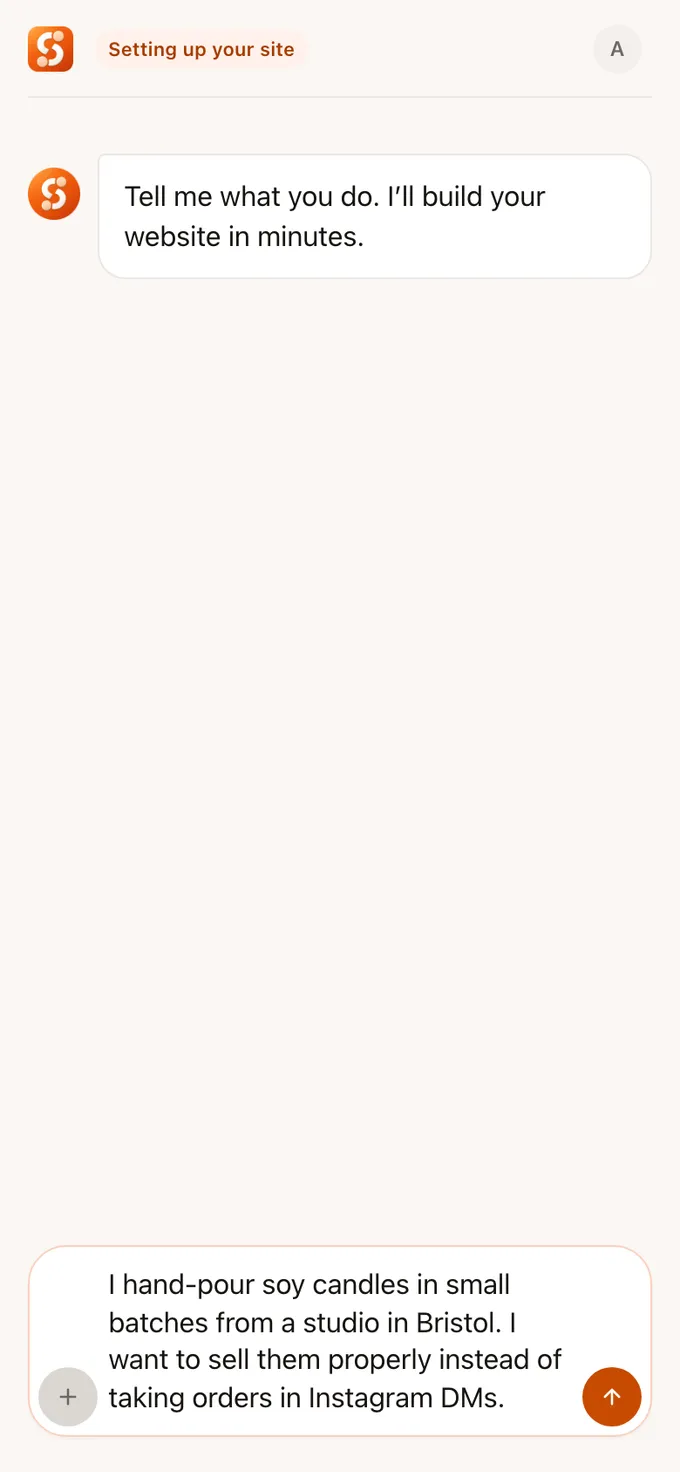
SiteSpin asks focused questions about the business. SiteSpin builds your website in minutes, with the pages, hosting and built-in ways to receive bookings, orders and messages.
The finished candle website
Ember & Wick’s live website has five pages: Home, Shop, The making, Refills and Contact. Its shop takes orders.

Ember & Wick is an example business built through SiteSpin. Use it to picture the result for your own work: pages explaining what you offer, a way to order and a way to contact you.
Keep the website useful after it is built
The next job is handling what comes in and keeping the details accurate. SiteSpin gives you a place to do that from your phone, with the same account and conversation on iPhone, iPad and in a browser.
The address and hosting are included
SiteSpin Pro includes secure hosting and an eligible domain, registered and renewed for you while you subscribe. The domain is the web address customers type to reach your website.
Included endings are .com, .net and .org. Country domains such as .co.uk and premium-priced names are excluded. You can connect a domain you already have instead.
Bookings, orders and messages reach the app
Bookings, order requests and messages arrive in the SiteSpin app. You reply to messages through your email app from your own address.
For bookings, customers choose from your available times. SiteSpin reserves their place and sends the details; you decide whether to confirm requests yourself.
Customers can pay for bookings and shop orders online through your Stripe account, with payments connected in the app. Check whether a booking request has been confirmed and whether an order has been paid before acting on it. You still provide the service, fulfil orders and answer customers.
Describe the next change
When your hours, prices or photos change, describe the change in the chat. SiteSpin updates your website. You can ask from your phone or a computer, with updates included in Pro within a daily allowance.
Visitor statistics without analytics cookies are included too. You can keep the website current and see its visitor statistics without choosing another analytics tool.
What you arrange with ChatGPT
ChatGPT Sites is useful for a simple page and includes hosting on Plus and Pro where available. Supported Business and Enterprise workspaces can also use it. Free and Go do not include Sites.
You create through Work on ChatGPT web, or Work or Codex in the desktop app, rather than ChatGPT Classic. OpenAI’s walkthrough also shows that ChatGPT can build and host a website from ChatGPT Work on your phone.
For a business website, check these parts before relying on it:
- Your address. Sites provides a chatgpt.site address. Where custom domains are available, you can connect one you control, but you buy and renew it separately. You copy the DNS records, the settings that point your address to the host, into your domain provider’s account. ChatGPT can help navigate that account after you sign in if browsing or computer use is enabled.
- Payments. You connect, configure and maintain a separate payment processor. Card details must pass through that processor. You remain responsible for orders, delivery, refunds, customer support, claims or warranties, and related taxes and fees.
- Requests and changes. Try the bookings, orders and messages you need, and check where each arrives. For later changes, ask ChatGPT, review the preview and publish the update.
- Public access. New websites are private by default. Choose “Anyone on the internet” when public publishing is enabled, then check the published address as a visitor.
- Availability and limits. Check your account before paying for Sites. Playcode reported that it was unavailable in the European Economic Area, Switzerland and the UK at its launch on 9 July 2026. That is a report of launch access. Building and changing websites uses your Codex allowance; running and hosting usage is separate. Shared limits can prevent you creating another website.
If you use code from a free chat
Ask for the website files and choose a host that supports them. Upload the files, buy and connect an address, then connect a payment provider and test where bookings, orders and messages arrive.
When the business changes, ask ChatGPT to change the files and publish the revised version. A file opened on your computer is not public, and a cart takes no money until a payment provider is connected. Hosting, the address, payments and each later update remain yours to arrange.
Our guide to making a small-business website covers the wider choices.
What SiteSpin costs beside ChatGPT Plus
SiteSpin is about $6 to $7 a month more than ChatGPT Plus with a typical .com domain. For that difference, you get an eligible domain, registered and renewed for you while you subscribe. Payments are connected in the app, with bookings, orders and messages arriving there too.
SiteSpin costs $28 a month on the yearly plan, billed at $334.99 a year before tax in the US. For one website, that includes:
- The website and secure hosting.
- An eligible domain, registered and renewed for you while you subscribe.
- Bookings, order requests and customer messages.
- Online payments through your Stripe account.
- Updates by chat within the daily allowance.
- Visitor statistics without analytics cookies.
Eligible owners can start with a 7-day free trial, confirmed at checkout before the build.
Compare the first year and the next
ChatGPT Plus at the US App Store price of $19.99 a month costs $239.88 a year. Add $12 to $25 for a typical .com domain and the total is $251.88 to $264.88. Sites hosting is included; you arrange the connections and upkeep described above.
| Route | Year one | Year two at the same prices |
|---|---|---|
| SiteSpin, with the inclusions above | $334.99 | $334.99 |
| ChatGPT Plus with Sites and a .com | $251.88 to $264.88 | $251.88 to $264.88 |
The annual difference is $70.11 to $83.11. The second-year figures assume the same subscription and domain prices continue. If the supplied chatgpt.site address suits you, you can leave the domain purchase out of the ChatGPT budget.
For code hosted separately, allow $40 to $150 a year for shared hosting and $12 to $25 for a typical .com, plus any paid ChatGPT subscription you choose. Confirm that the host supports your files before paying.
Include your time and any extra bills
Allow for the time you spend choosing a host, connecting the address and payments, testing requests and publishing later changes. If you need paid help, ask for a quote for that setup. For scale, a WordPress developer’s hour at $50 to $95 costs about two to three months of SiteSpin on the yearly plan.
SiteSpin also offers month-to-month billing at $35. Card processing fees apply to payments through your Stripe account; SiteSpin adds no transaction fee of its own. Allow for taxes, processing fees and any paid help when comparing the routes.
See what a small-business website costs for the wider budget, or SiteSpin pricing for the plan and eligibility. SiteSpin is available in the US, Canada, the UK, the EU, the Nordics, Australia and the other markets on the pricing page.
A checklist before you choose
- Can you access the tool and publish a website anyone can visit?
- Have you included the address, hosting and renewals?
- Can a customer complete the booking, order, payment or message you need?
- Does it reach you with a clear confirmation or payment status?
- Can you change the website from the device you use during the day?
- Have you counted your time, processing fees and any setup help?
When ChatGPT is the right choice
Choose ChatGPT Sites if a simple page meets your needs, you have access and you are comfortable arranging any extra connections. The free-code route fits if learning to publish and maintain the files is part of what you want.
If you want the website and its bookings, orders, messages and upkeep together, start with SiteSpin. Describe your business from your phone and answer the focused questions. Later, say what changed to keep the website current.
Start your website. Checkout confirms the plan and free-trial eligibility before SiteSpin builds.
If you already have access to ChatGPT Sites and only need a simple public page, its included hosting may be enough. The free-code route also fits if learning to publish and maintain website files is part of what you want. Check access and test any payments or customer requests before relying on it.
Common questions
Can ChatGPT make a website for free?
You can ask free ChatGPT for a website, but Free and Go do not include ChatGPT Sites. If you use code from a chat, you arrange separate hosting, any custom domain and the connections for payments and customer requests.
Does ChatGPT Plus include website hosting?
Hosting through ChatGPT Sites is currently included with Plus and Pro where available. Building and changing websites uses your Codex allowance; running and hosting usage has separate limits.
Can I use a custom domain with ChatGPT Sites?
Where the feature is available, you can connect a domain you already control. Sites does not register it, so you buy and renew it separately and change its DNS records, the settings that point the address to the host.
Can customers pay on a ChatGPT website?
Yes, Sites can use a separate payment processor, which you connect, configure and maintain. Card details must be handled through that processor, and you remain responsible for orders, delivery, refunds, customer support and related taxes and fees.
Is ChatGPT Sites available in the UK or EU?
At its launch on 9 July 2026, Sites was unavailable in the European Economic Area, Switzerland and the UK, according to Playcode. That describes launch access, so check your account before subscribing for Sites; SiteSpin is available in the UK and EU.
Sources
- OpenAI, Building a shareable site, read
- OpenAI Help Center, Creating and using ChatGPT Sites, read
- Playcode, ChatGPT Sites explained, features and limits, read
- Apple, ChatGPT on the App Store (in-app purchases), read
- Tailwind CSS, Play CDN, read
- WebsiteSetup, Small business website costs (what to expect in 2026), read
- SiteSpin, SiteSpin pricing, read