
Guides
How to make a website for your small business
Start with what you offer, who it is for and whether customers should make bookings, place orders or send messages. Choose how to build, supply your facts and photos, then test and publish. SiteSpin builds your website in minutes from your answers in chat; later, say what changed from your phone.
By SiteSpin Published Last verified
Start with the job your website should do
To make a website for your business, decide what you offer, who it is for and whether customers should make bookings, place orders or send messages. Choose how to build, supply your facts and photos, then test the finished website before publishing. SiteSpin builds your website in minutes from your answers in chat; later, you say what changed from your phone.
Choose who does the build
Choose according to the work you want to take on, including later changes.
SiteSpin: start by describing your business from your phone or computer. Its questions help you supply the offer, customers, facts and look. SiteSpin builds your website in minutes, with bookings, order requests and messages arriving in the app. You supply accurate information and photos, check the result and handle customers’ requests.
A do-it-yourself builder: a good choice if you want to arrange the pages yourself. Plan to choose a design, prepare the text, arrange the domain and check which tools your customer action needs. Include learning how to make changes.
A freelancer or agency: a good choice if you want someone to develop the brief and design with you. Agree what you will supply, what the price covers and how later changes happen. Ask them to demonstrate your bookings or orders before committing.
Considering ChatGPT? Read can ChatGPT build a website? before choosing that route.
The decisions below prepare your answers and help you check the result on any route. Follow them through Ember & Wick, SiteSpin’s example candle maker with a studio in Bristol.
Say what you do and who it is for
Write the explanation you would give a neighbour: what you do, where you do it if that matters, and whom it helps. Save it in a note on your phone.
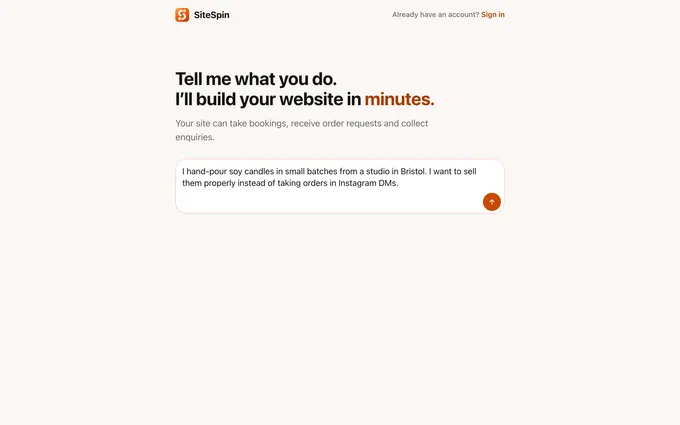
Ember & Wick’s opening message is:
I hand-pour soy candles in small batches from a studio in Bristol. I want to sell them properly instead of taking orders in Instagram DMs.
Its customers are people buying a considered gift and regulars returning for a refill. That gives the website distinct jobs: help a gift buyer choose and help a returning customer find refills.
Use this test for your sentence: could someone who has never met you explain what you offer after reading it? If they cannot, make it more specific before choosing a design.
With SiteSpin: type your explanation into the opening chat; its focused questions help you fill in the details.
Choose what customers should do, then plan the pages
Choose the main action you want a visit to lead to:
- Bookings: choose a service and an available time.
- Orders: choose products and send a request or pay.
- Messages: explain what they need so you can reply.
Ember & Wick needs orders. Its main button says “Shop the candles”. Follow your own button through: what does the customer need to know next, and where will the request arrive?
For bookings, decide whether you need to approve requests and when payment is due. For orders, decide how customers pay and receive their purchase. For messages, ask for the information you need to give a useful reply.
Now plan the pages around those questions. A service business should explain what it does and where, list services and prices or how to request a quote, show examples of work, and explain how to book or send messages. These can be sections on the same page.
Ember & Wick has Home, Shop, The making, Refills and Contact. Use the same reasoning for your business: each page should answer a question or help someone act. A regular looking for refills should not have to read the whole making story.
With SiteSpin: explain the action you need; bookings, order requests and messages arrive in the app, you choose whether to approve bookings, and customers can pay for bookings and shop orders through your Stripe account.
Settle the business name and website address
Use the business name customers should recognise. Then choose a domain, the address people type to reach your website.
Ember & Wick’s live example is at ember-and-wick.sitespin.app. For your business, say a possible address aloud and ask someone to type it without seeing it. Check availability before putting it on cards, packaging or signs.
Ask who arranges registration and renewal, what renewal costs and what happens to the address if you leave the service. Keep those answers with your account details.
If you already use a domain, explain that before the build. Include connecting it in the work you agree with your provider.
With SiteSpin: Pro includes an eligible domain, registered and renewed for you while you subscribe; you can connect a domain you already own instead.
Included endings are .com, .net and .org. Country endings such as .co.uk and premium-priced names are excluded. A domain connected from another provider keeps that provider’s renewal fees.
Gather the facts customers check before acting
Prepare prices, hours, location, delivery or service area, and contact details. Use the same note to check every page.
Ember & Wick’s practical details are:
- Unit 7, Old Market Studios, Bristol BS2 0EJ.
- Studio collection on Thursdays, 10:00 to 16:00.
- Orders ship on Tuesdays and Fridays.
- UK shipping is £4.50 per parcel; local collection is free.
- Jar refills are available at the studio on Thursdays.
- Contact is by email, with no public phone.
Put details where they affect a choice. Someone choosing collection needs the hours there. A buyer considering delivery needs the shipping charge before deciding to order.
Read each detail as a promise. “Ships on Friday” does not mean “arrives on Friday”. That difference matters to someone ordering a gift.
For services, make equally clear where you travel, what a price includes and what information you need before quoting. Mark anything you still need to decide rather than letting someone guess.
With SiteSpin: supply these facts in the conversation, check them on the finished pages and describe later changes in the same chat.
Choose a promise you can keep
Give someone a concrete reason to choose your work. Use something you would point out while showing it to a customer.
Ember & Wick’s promise is:
Poured in batches of forty, with jar refills available at the Bristol studio.
That sentence tells a gift buyer how the candles are made and a returning customer where refills are available.
For your business, choose a detail you can deliver on an ordinary day. Explain it in words you would say aloud. Read the finished text for any claim that goes beyond what you actually do.
With SiteSpin: explain what makes your work worth choosing, then ask for changes if the resulting text promises too much.
Choose a look and gather useful photos
Describe the look in ordinary words. Ember & Wick uses an earthy, organic look in cream and olive. Judge the result by whether the candles are clear, the words are readable and “Shop the candles” is easy to find.
Gather photos of your actual products, work or place. Decide what each helps a customer understand. For products, check that the picture makes clear what the order includes. For services, show the work someone is choosing you to do.
Ember & Wick uses licensed stock photographs because it is an example business. Those pictures demonstrate a look; they do not show a real maker’s products.
With SiteSpin: describe the look and supply your own photos; SiteSpin asks for the owner’s photographs and does not source stock photographs for owners’ websites.
Decide who keeps it current
Name the person responsible for prices, hours, offers and photos. Give them a way to make changes that they will actually use.
For Ember & Wick, the practical question is how changed Thursday collection hours would reach the website. Try the equivalent on your chosen route before committing. With a builder, find the relevant page and change a detail. With a designer, agree how to request it, the cost and the expected response time.
Keep the approved facts and access details where the responsible person can find them.
With SiteSpin: say what changed from your phone or computer; Pro includes updates by chat within a daily allowance, using the same account and conversation on iPhone, iPad and the browser.
Check the build before you publish
Your decisions are now a brief you can check against the finished website.

Open Ember & Wick’s live example website beside its opening message. Look at the candles, the cream and olive look, the “Shop the candles” button and the refill information. These are concrete things to compare with the original intention.
Do the same on your own website, using your phone and a computer. Read the opening text, follow the main button and complete the intended action.
Check both the customer’s experience and what you receive:
- Are the offer, prices, hours, delivery and collection details correct?
- Can customers tell whether they sent a request, confirmed a booking or paid?
- Do the bookings, orders or messages reach the right person?
- Do contact options and links work?
- Does the chosen website address open the finished pages?
For payments, follow the payment provider’s testing instructions. Check the result and the notification as well as the payment screen.
SiteSpin builds your website in minutes. Gathering photos, checking the pages, arranging payment access and checking that the domain is ready are separate tasks. Include them when planning your launch.
Publish, then improve it during the first week
After testing, publish and put the address where customers already find you. Ember & Wick’s opening message names Instagram; adding the website address there gives someone a path from discovering the candles to placing orders.
During the first week, check incoming bookings, orders and messages. Keep a note of questions people still ask. If someone asks when collection is available, look at the information beside the collection choice.
Fix wrong prices, missing details or unclear instructions promptly. Make a real update through your chosen method and check the result. With SiteSpin, that means describing the change from your phone, then opening the website to confirm it.
Compare the full cost, including your time
Compare a website that does the job you need over year one and year two. Include the build, domain renewal, bookings or orders, payment fees and later changes. Include hosting, the service that keeps the website online.
SiteSpin Pro is $28 a month on the yearly plan, billed at $334.99 a year, before tax in the US. It includes:
- The website and secure hosting.
- An eligible domain, registered and renewed for you while you subscribe.
- Updates by chat within a daily allowance.
- Online bookings, order requests and customer messages.
- Online payment for bookings and shop orders through your Stripe account.
- Visitor statistics.
SiteSpin adds no transaction fee of its own; the payment provider’s card fees apply. Messages arrive in the app, and you reply through your email app from your own address.
For a website selling products, compare these yearly plans:
| Route | Year one | Year two |
|---|---|---|
| SiteSpin Pro | $334.99 | $334.99 |
| Squarespace Core | $348 | $360 to $373 |
Squarespace Core supports selling online with no Squarespace transaction fee. The comparison includes a standard .com renewal at $12 to $25 from year two. SiteSpin costs $13.01 less in year one and $25.01 to $38.01 less from year two, with the website built for you and changes made by message.
For a commissioned build, WebsiteSetup gives typical freelancer prices of about $2,000 to $7,600 and agency prices of $5,000 to $15,000. Ask separately about hosting, domain renewal, payment fees and ongoing changes.
Alongside each quote, write the tasks still left to you: preparing pages, arranging the address, checking extra tools and making updates. Estimate your hours without assuming they are free. Check any extra tool costs against your bookings or orders.
Eligible owners can start SiteSpin with a 7-day free trial, confirmed at checkout before the build. See Pro details and what a small business website costs for the wider budget.
When to choose another approach
Choose a do-it-yourself builder if arranging the pages yourself is part of what you want. Choose a designer if you want a person to develop a particular design with you.
If the website must connect to another business system or meet a particular requirement, ask a prospective provider to demonstrate that task before committing. Bring the same brief and agree who handles later changes. Choose on the requirement you have seen demonstrated.
A checklist to copy
- What I offer, and whom it is for:
- Main action: bookings, orders or messages:
- What counts as a completed action:
- Pages or sections customers need:
- Business name and website address:
- Prices, hours, location, delivery and contact details:
- Promise I can keep:
- Look and photos I will supply:
- Who builds it, and the full ongoing cost:
- Who changes it, how and at what cost:
- Before launch: test the customer’s action and what I receive:
- First week: check incoming activity and fix missing details:
To start with SiteSpin, check eligibility for the 7-day free trial, then describe what you do in the chat. Answer its questions using your checklist. SiteSpin builds your website in minutes; afterwards, keep it current by saying what changed from your phone.
If your website depends on another business system or a particular design, ask a prospective builder or designer to demonstrate that requirement before committing. Take your brief and agree who handles later changes, how and at what cost.
Common questions
Can I create a business website by myself?
Yes. With SiteSpin, describe your business, answer focused questions and supply your photos. Check the resulting pages and test bookings, orders or messages before publishing.
What pages does a small business website need?
Cover what you do, where you work, services and prices or how to request a quote, examples of work, and how to make bookings or send messages. These can be sections on the same page. For a shop, Ember & Wick's example uses Home, Shop, The making, Refills and Contact.
How long does it take to make a website?
SiteSpin builds your website in minutes. Allow separately for gathering facts and photos, reviewing the pages and testing the customer action. Ask any provider whether its estimate also covers the website address being ready to use.
Do I need to write all the text before I start?
Prepare accurate facts and a plain description of your offer first. SiteSpin asks questions to build from your answers; check the resulting text, prices and practical details before publishing.
How do I choose a website address?
Choose an address you can say aloud and a customer can type without an explanation. Check availability and renewal terms before putting it on labels, cards or signs.
Sources
- SiteSpin, SiteSpin reference business, Ember & Wick, read
- Openprovider, What the .com price increase in 2026 means for your domain portfolio, read
- WebsiteSetup, Small business website costs (what to expect in 2026), read