
Guides
Best website builder for personal trainers
The best website builder for personal trainers lets clients find you, book a session and pay to confirm it, while you manage your schedule from your phone. SiteSpin is the easiest way: tell it what training you offer, and it builds your website with bookings, classes, payments and messages working together. Change your hours, move a booking or add a class by asking.
By SiteSpin Published Last verified
Which website builder is best for a personal trainer?
The best website builder for personal trainers lets clients find you, choose a session and time, and pay to confirm their booking from their phone. SiteSpin is the easiest way: it builds your website with bookings, classes, payments and messages working together, and you run your schedule from your phone. To change your website or bookings, ask SiteSpin.
You don’t have to choose tools, write pages, arrange a web address, set up bookings or keep everything up to date yourself. Tell SiteSpin what you offer and provide the training. It handles the website, bookings and later changes.
Does it replace a coaching app?
SiteSpin handles your public website, bookings and messages. For workout programs, check-ins and progress tracking, use a coaching app. SiteSpin doesn’t automatically bill memberships or track how many sessions a client has left in a pack.
Trainerize, TrueCoach and Coachway handle programs, check-ins and progress. TrueCoach also takes recurring client payments. To help clients find you online, these apps offer profile pages or forms you add to a website you already have.
Coachway’s own guide says you shouldn’t expect a coaching platform to build your marketing website. Trainerize’s guide also points trainers toward website builders.
Keep your coaching tool alongside SiteSpin. The website can link to it, and SiteSpin can add another company’s widget for you. For life, business or wellness coaching, see the website builder for coaches.
What happens when you tell SiteSpin what you train?
Here’s Mara Chen Strength, an example personal training business in Austin, Texas. SiteSpin built its website. The home page starts with what clients can book: “Strength classes for six and one-to-one training.” Visitors can choose Book now or Send a message.
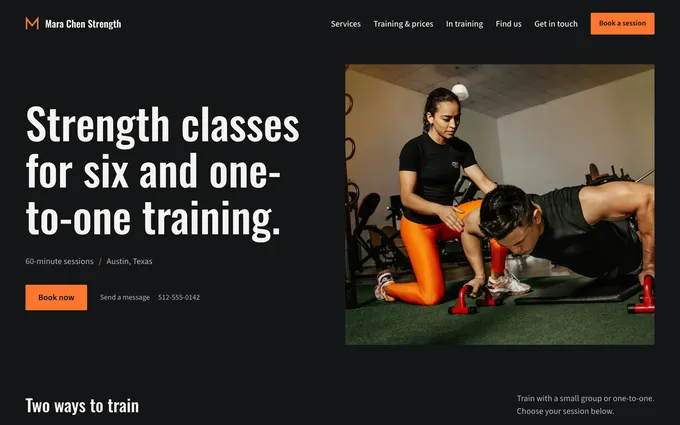
The first message was:
“I’m a personal trainer in Austin. I run small strength classes of six and one-to-one sessions, and I need a website where people can book.”
SiteSpin used that message to prepare the bookings, then asked: “Is this what people can book? Change anything that’s off.” It also asked where the sessions happen, whether the trainer had photos and how they wanted the website to look and feel. It doesn’t ask you to repeat details you’ve already given.
As you answer, SiteSpin creates three complete designs for your business. Choose the one you like. It plans your pages and writes them using the details you give it, without inventing services or claims. Then SiteSpin builds your website in minutes. Before you see it, SiteSpin checks your home page on a phone and a computer and fixes anything that reads wrong.
On Mara’s example website, the services are:
- Small-group strength class: 60 minutes, $28, in a group of six.
- One-to-one session: 60 minutes, $95.
- Four-week beginner block: $180.
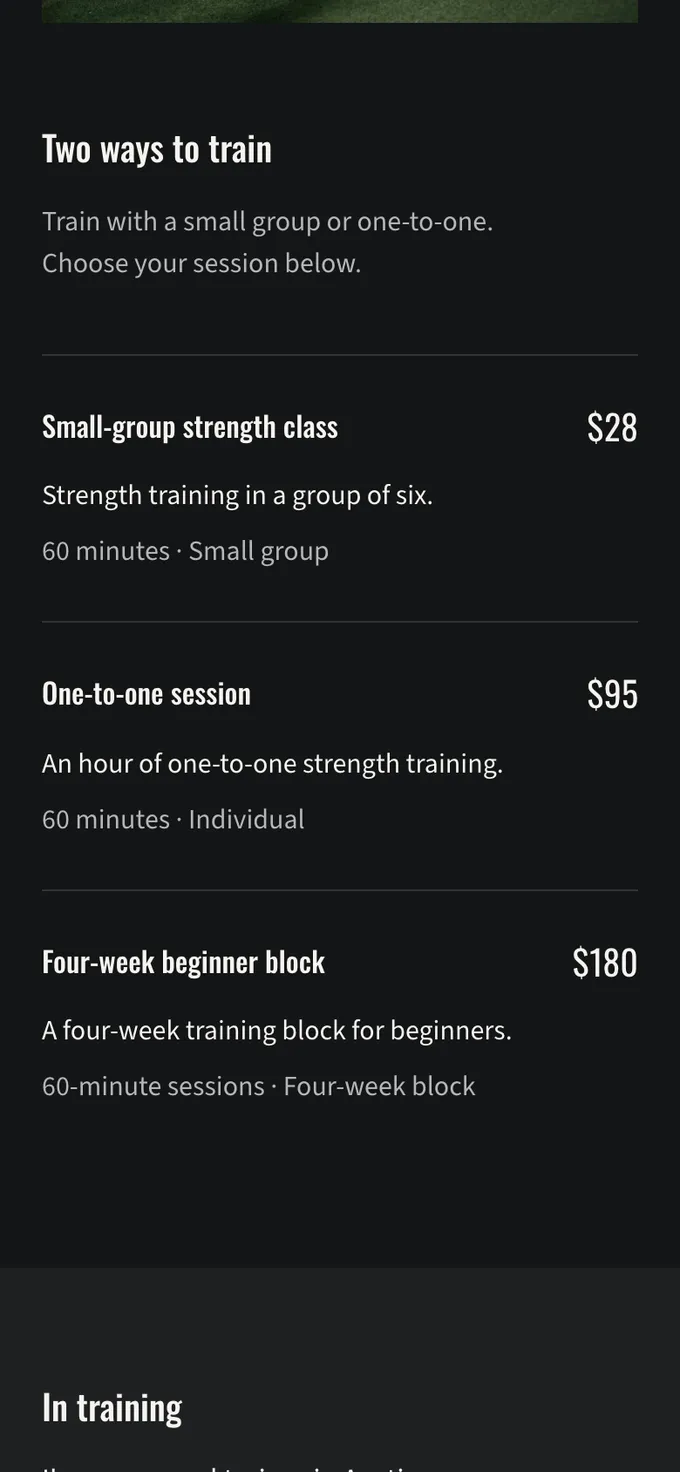
Clients can see session lengths and prices before they book. SiteSpin also prepares your business details so Google, Bing and AI assistants can read what you offer, where you are and when you are open.
How do clients book a session or a class?
A client chooses a session, then an available time. The example website offers the next available time first. Clients can choose another day from the week shown below.
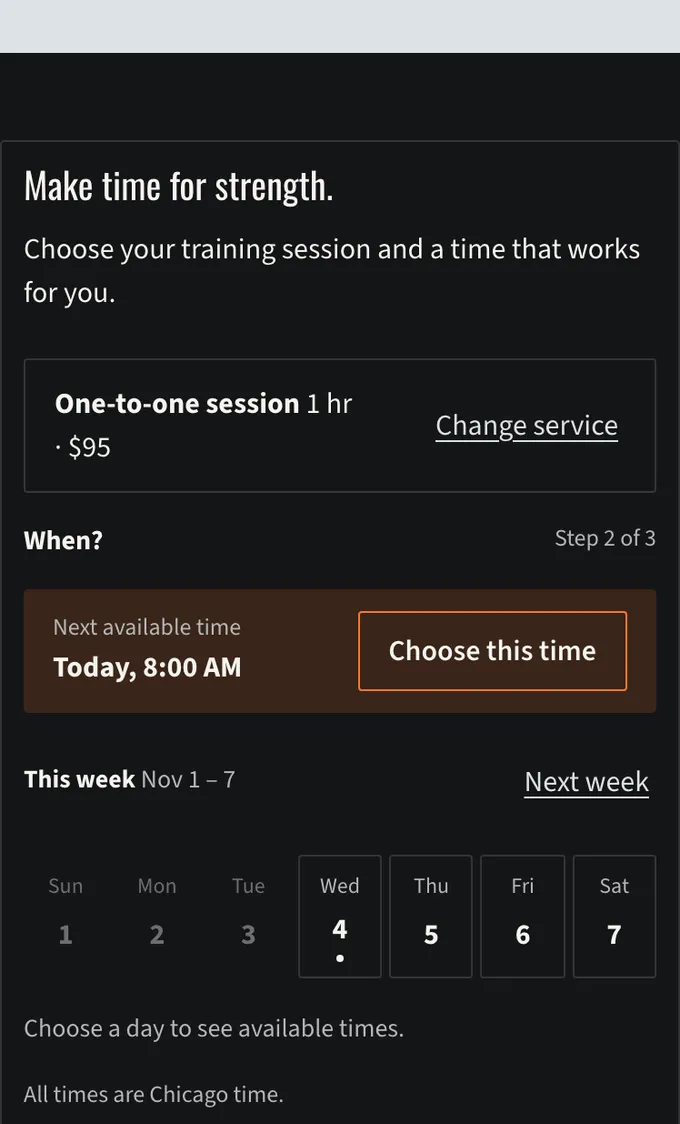
Each session has its own length and price. SiteSpin shows available times based on your regular hours, any special hours you set and which trainer runs the session. Two clients can’t book the same time for a one-to-one session.
Classes have a set number of spots and a waiting list. You choose whether bookings are confirmed right away or need your approval.
Groundwork Strength, another example business built with SiteSpin, is a strength gym in Brighton, England. Its weekly class timetable has room for up to six lifters per class.
Every booking confirmation includes a calendar file so clients can add the session to their calendar. Confirmation and reminder emails use your business’s name and colors, in your website’s language. The website builder with online booking page explains the booking tools in more detail.
How do you handle payment and no-shows?
For each session, choose whether clients arrange payment directly, can pay online if they want to, or must pay online to confirm the booking. In the app, these are Not offered, Optional and Required to confirm. Use Booking default to follow the payment rule you’ve set for bookings.
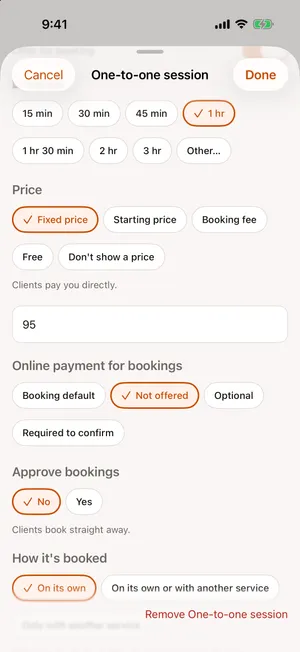
Payments go through your own Stripe account. SiteSpin adds no transaction fee of its own; the payment provider’s card fees apply. Refunds, disputes and statements are in the app too.
Ask SiteSpin in the chat for a payment link to send one client. It opens a secure payment page on your own website.
SiteSpin sends reminders before the session. Clients can move or cancel their own bookings according to your rules, including the cancellation window you set.
Can you manage your schedule between sessions?
See your bookings by day or month in the SiteSpin app on iPhone and iPad. A morning summary tells you who’s booked. When a booking request arrives, confirm it from the notification or offer up to three other times.
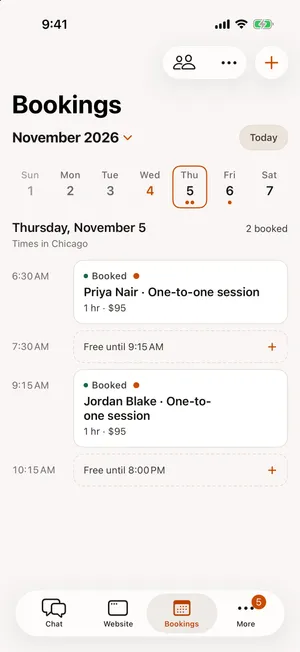
If a session runs over, tell SiteSpin you’re running late. It moves your later bookings or lets those clients know. You can do this from your phone while you’re still at the gym.
Your bookings also show up in your usual calendar app, with a separate feed for each trainer. After a visit, SiteSpin can ask the client for a review, no more than once in 90 days.
Use the same chat for everyday changes. Say “close Saturday” or “add a Wednesday morning class” by text or voice. You can change hours, days off, staff and classes this way. SiteSpin updates your bookings and every website page affected by the change.
If you ask for a new look, SiteSpin shows you the before and after. You choose whether to publish it or keep what you have. You can also use the same account and conversation in a browser.
Can you bring your existing clients?
SiteSpin can bring your client list over from another booking tool. You keep your existing clients’ details and manage your website and bookings from one app.
If you already have a website, SiteSpin can bring over its content too. It can also connect a domain you already own. After that, ask for a new session, a price change or different hours in the same chat you use for bookings.
What else comes with the website?
Some clients will want to ask about a class before they book. Every SiteSpin website has a contact form, and you can add more forms with their own questions when you need them. Forms have spam protection, and SiteSpin adds a privacy notice wherever your website collects details. Messages arrive in the app, where you reply as your business. The client’s reply comes back to the same conversation.
In Visitors, see how many people visited your website, which pages they read, where they came from and which bookings and messages came from those visits. The statistics work without analytics cookies.
A shop and a blog are included too. Your shop can show product photos, prices, sizes and delivery options. Tell SiteSpin your news and it can write a blog post with a photo. From your phone, ask it to add products, update posts, change bookings or update the website. Orders and messages come into the same app.
What work do other website builders leave you?
SiteSpin builds your website, sets up bookings and makes changes when you ask. Here’s what you’d need to do with other builders, based on their own pages read in October and November 2026.
Wix: You add Wix Bookings from the App Market, then finish setting it up in the website editor. You need an upgraded plan to take online payments. You adjust the mobile view yourself. For more complex changes, Wix points you back to a computer. The Wix comparison explains the setup in more detail.
Squarespace: You need an Acuity Scheduling account and a separate subscription. You then add its booking page to your website using a scheduling block. You manage Acuity separately from the Squarespace app. See the Squarespace comparison.
GlossGenius: It offers a booking website for beauty and wellness businesses. The pages we read in November 2026 didn’t mention a custom domain or say whether you could change the website from your phone.
What does the complete setup cost?
SiteSpin builds your website and makes the changes you ask for. A fair comparison includes the whole setup: a website and web address, bookings for multiple trainers and classes, online payment, confirmations and reminders, a shop, a blog, messages and visitor statistics. You also need to manage bookings and orders from your phone. See what a complete small business website costs for the details.
These are rounded monthly prices in US dollars, read in October 2026. They don’t include card processing or the cost of paying someone to set up the other routes.
Squarespace Basic with Acuity Standard is about $46 a month, plus 2% of shop sales on Basic. Square Plus is about $49 a month. Shopify Basic with a booking app is about $62 a month, using Shopify Payments.
Wix Core with its own bookings and shop is about $29 a month, the lowest price among the other setups listed here. You choose the design, adjust the mobile view and set up bookings and payments yourself.
With Wix, Squarespace, Square and Shopify, the domain is free for the first year at most, and you pay separately to renew it. SiteSpin includes a custom domain, renewed for you automatically.
If you hire someone to build the website, that fee is separate from the tools. WebsiteSetup puts a typical freelancer’s fee for a small business website at $2,000 to $7,600, or $5,000 to $15,000 for an agency.
SiteSpin is $28 a month, with everything above included: the website built for you and kept online, the domain, bookings and classes, online payment, messages, a shop, a blog, visitor statistics, the app and the changes you ask for. The pricing page has the billing details.
Who makes SiteSpin?
SiteSpin is an independent company in Stockholm, Sweden, with no outside investors. It is built by a small business, for small businesses.
SiteSpin has been on the App Store since May 11, 2026. It has built 1,000+ websites for businesses in at least 18 countries. Meet the company.
Start with the sessions you offer
Tell SiteSpin what training you offer, where sessions happen and how clients can book. It asks a few questions, then prepares your website and bookings. Use the same app between sessions to run your schedule, reply to messages and ask for changes.
New to SiteSpin? Your first 7 days are free, and nothing is charged until they end.
SiteSpin doesn't deliver workout programs, check-ins or progress tracking. It also doesn't automatically bill memberships or track how many sessions a client has left in a pack. You can link to specialist tools from your website; SiteSpin isn't designed for custom software, accounting or advanced commerce operations.
Common questions
What is the best fitness app for personal trainers?
SiteSpin brings your website, bookings and messages together on your phone. A coaching app such as Trainerize, TrueCoach or Coachway handles workout programs, check-ins and progress tracking.
Do personal trainers need a website if they use a coaching app?
A public website lets new clients see your sessions and prices, book and pay. SiteSpin builds that website and can link it to your coaching app; Coachway's own guide says a coaching platform should not be expected to build your marketing website.
Can clients pay when they book a session?
Yes. Each session can use Booking default, Not offered, Optional or Required to confirm. Payments go through your own Stripe account, with no SiteSpin transaction fee; the payment provider's card fees apply.
Can I move my clients from another booking tool?
Yes, SiteSpin can bring your client list across from another booking tool. You then run bookings, messages and website changes from the same app.
Who makes SiteSpin?
SiteSpin is an independent company in Stockholm, Sweden, with no outside investors. It is built by a small business, for small businesses.
Sources
- ABC Trainerize, ABC Trainerize pricing, read
- ABC Trainerize, Best personal trainer website builders, read
- TrueCoach, TrueCoach, read
- Coachway, Coachway, read
- Coachway, How to build a personal trainer website, read
- GlossGenius, GlossGenius pricing, read
- GlossGenius, Booking website builder, read
- Wix, Fitness website, read
- Wix Help Center, Wix Bookings: About Wix Bookings, read
- Squarespace Help Center, Adding online booking to your site, read
- Squarespace, How to make a personal training website, read
- Acuity Scheduling, Acuity Scheduling pricing, read
- Squarespace, Squarespace pricing, read
- WebsiteSetup, Small business website costs (what to expect in 2026), read
- SiteSpin, SiteSpin pricing, read