
Guides
Best website builder for a small business
The best website builder for a small business leaves you the least to set up and keep current. SiteSpin is the easiest way to get online, with the website, bookings, a shop, payments and messages working together. Tell it what you do, then change the website and manage the business from your phone by asking.
By SiteSpin Published Last verified
Which website builder is best for a small business?
The best website builder for a small business leaves you the least to set up and keep current, so clients can read about your services, book and pay. SiteSpin is the easiest way: it builds the website with bookings, a shop, payments and messages working together. You describe your business, then manage it and ask for changes from your phone.
What should a small business look for in a website builder?
SiteSpin writes the pages and prepares bookings. It also keeps your website’s details current. Other routes can leave those jobs to you, even after AI has produced the first version.
Use these questions to judge how much of the job a builder takes on:
- Who designs and writes the website? SiteSpin plans the pages, writes from your business details, draws three complete designs and places your photos. Look at what you would still need to arrange in an editor.
- Who sets up what clients need? SiteSpin prepares bookings and includes a shop, online payment, messages and a blog. Ask what comes with the website and what you must add separately.
- Who makes next month’s changes? With SiteSpin, you say what changed by text or voice. Ask whether a new price, page or look means learning an editor or finding someone to help.
- What can you do from your phone? SiteSpin’s app brings together bookings, orders, messages, payments, visitor statistics and website changes. Ask what would send you back to a computer.
- What happens to the web address later? SiteSpin includes a custom domain, renewed for you automatically. Many builders include a domain for the first year only, then charge for renewal.
SiteSpin keeps checking that the website is up. A domain you already own can be connected instead.
The useful comparison is the whole job, from describing your business to changing its opening hours after launch. Here is what that looks like in SiteSpin.
How does SiteSpin build the website and prepare bookings?
Mara Chen Strength is an example business: a personal trainer in Austin offering private sessions and small-group strength classes. SiteSpin built its website. The example shows the conversation, the website and the app the owner uses afterward.
Start with what you do
The first message was:
I’m a personal trainer in Austin. I run small strength classes of six and one-to-one sessions, and I need a website where people can book.
SiteSpin asked about the website’s language, the business name and whether there was an existing website to bring content from. It had already prepared a booking setup to discuss. It then asked where sessions happen and whether there were photos. It also asked how the website should look and feel.
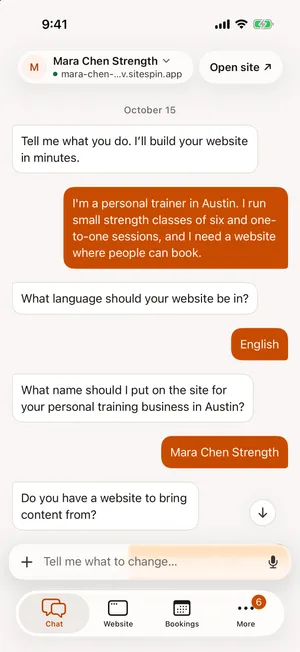
These are questions about the business, asked one at a time. SiteSpin doesn’t ask again for details you’ve already given. If you’re unsure, say so: it can ask an easier question or suggest a choice.
You can speak instead of typing and send photos from your phone. If you already have a website, SiteSpin can bring its content across. You supply the business details and any photos. SiteSpin makes the website decisions.
Choose from designs made for the business
SiteSpin drew three complete designs for the example: Big type, Quiet craft and Local classic. It marked the one it recommended. The owner chose Quiet craft.
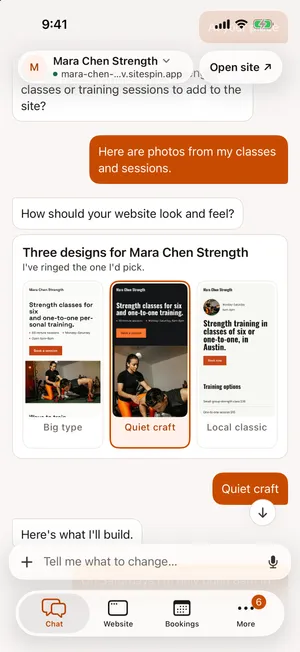
The designs draw on a library of real websites from businesses like yours. SiteSpin plans the pages and writes the words from what you told it. It sticks to your facts: no invented claims, no payment methods you don’t take and no booking button that cannot book. When photos arrive in the chat, it decides which should lead and where the others belong.
Without photos, it designs with type, color and shape. SiteSpin builds your website in minutes.
Before you see the result, it looks at the home page on a phone and a computer and fixes what reads wrong. It sizes photos for each screen, keeps text from jumping as it loads and checks every page for accessibility.
The example website opens with “Strength classes for six and one-to-one training.” Visitors can choose Book now or Send a message. There are pages for services, training and prices, and how to find the business.

Forms have spam protection. A privacy notice appears where the website collects details. The pages also set out what the business offers, where it is and when it is open so search engines and AI assistants can read them.
See services ready for clients to book
The example’s services include:
- A one-to-one session: one hour, $95.
- A small-group strength class: one hour, $28, with six places.
- A four-week beginner block: $180.
The app shows the services, durations and prices prepared from the conversation. Clients book those services through the website’s Book now button.
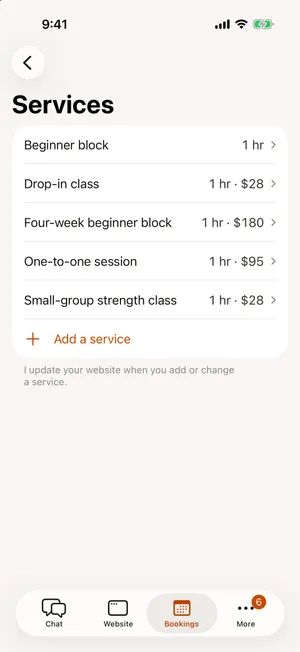
That system handles staff, opening hours, classes with places and a waiting list, reminders and cancellation rules. You can have bookings confirmed instantly or require your approval. Clients can move or cancel within your rules. The system prevents double bookings.
In this example, Online payment for bookings is set to Not offered, so clients arrange payment directly. It can be switched to Optional or Required to confirm.
Online payment for bookings and orders runs through your own Stripe account. SiteSpin adds no transaction fee of its own. The payment provider’s card fees apply. Refunds, disputes and statements are available in the app.
Can you run the website and bookings from your phone?
Bookings, orders and messages arrive together in SiteSpin’s app. On iPhone and iPad, you can see the booking day or month. You can confirm a request from its notification or offer other times. The same account and conversation are available in the browser.
The booking day for Mara Chen Strength, the example business, is in the same app.
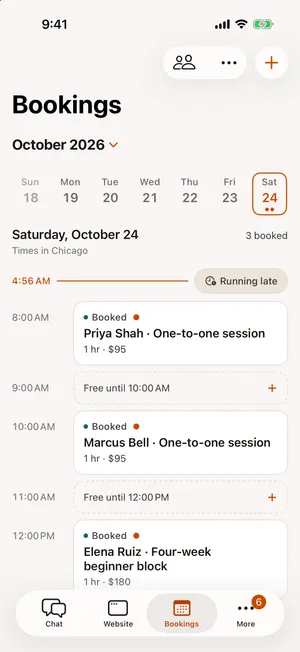
If you’re running late, tell SiteSpin. It can move your later bookings or let those clients know. You can also ask it to change your working hours or close for a day in the same conversation.
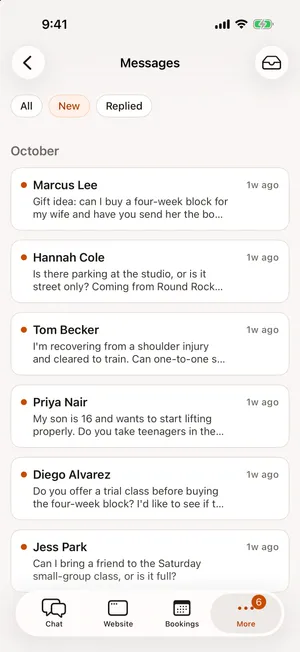
Messages from the website arrive in an inbox, marked new, replied or archived. You reply as your business, from your own address. The customer’s answer comes back to the same conversation.
In Visitors, you can see how many people came to your website, the busiest day, the pages they read and where they came from. It uses no analytics cookies. You can also see the bookings, messages, orders and money those visits led to.
What happens when your business changes?
Ask SiteSpin for new hours, prices, photos or a page. A request such as “put my prices up 10%” reaches every page where those prices belong.
For a different look, SiteSpin shows the before and after. You choose whether to publish it or keep what you have. Earlier versions are kept, so you can go back to one.
You can run the business from the chat too: move a booking, close for a day or ask for a payment link to send a customer. The request and the change happen in the app you already use for the website.
If you sell products, the shop shows their photos, prices, sizes and options. It also handles delivery and sold-out items. Ask SiteSpin to add a product or change its price. Digital files can be sent once the customer has paid.
Tell SiteSpin your news and it becomes a blog post with a photo. Bookings, products and posts stay part of the same website. Orders and messages arrive in the same app. You don’t have to arrange a separate service for each.
What do other website builders leave you to do?
SiteSpin designs the pages, prepares the business tools and makes later changes. The other options below leave some decisions and setup tasks to you. These descriptions follow their documentation as it stood in October 2026.
Wix
Wix’s Aria builds a first version from a chat. You make changes in a visual editor. Aria adjusts the desktop view only, so you edit the mobile view yourself. You add Wix Bookings and finish its setup in the editor. Core is needed for online payment. The domain is free for the first year. See the Wix comparison.
Squarespace
Squarespace gives you an AI starting point to refine through conversation or its drag-and-drop editor. Appointments use Acuity Scheduling, a separate subscription managed in a separate app. The Squarespace app lets you change the content in a block, but you cannot add or rearrange blocks. See the Squarespace comparison.
Hostinger
Hostinger starts from your description or a template, then gives you its drag-and-drop editor. You set up appointments as a product type in Store Manager on a plan that supports online sales. The included domain is free for the first year.
GoDaddy Airo
GoDaddy Airo builds a website from your instructions. It calls this “vibe coding” and lets you view and edit the code it creates. Its AI credits expire each billing cycle. Its booking reminders, payment at booking and phone management are not documented. The domain is free for the first year only. See the GoDaddy comparison.
Durable
Durable’s AI Partner takes change requests in your own words, then returns a draft to review in its editor and publish. Durable Payments is available to businesses in the US, Canada, Australia and the UK. See the Durable comparison.
Framer
Framer combines an AI agent with a design canvas, leaving the final design decisions to you. AI work uses credits. You add Cal.com for bookings and a Marketplace tool for selling. Basic is labeled “Creative personal sites”. See the Framer comparison.
ChatGPT Sites and Lovable
These options let you direct work on a website or app through a chat. With ChatGPT Sites, you buy and connect the domain. You also connect and maintain payments. Bookings, messages and statistics need separate services. Lovable is mainly for apps that run in a browser, with bookings built or connected. Its phone app works alongside a computer. Read Can ChatGPT build a website? and the Lovable comparison.
What does the whole setup cost?
SiteSpin takes on the building and later changes as well as providing the business tools. A fair budget includes that work alongside the subscriptions.
The complete setups below cover a website on a business web address, bookings for staff and classes with online payment, a shop with checkout, a blog, messages and visitor statistics. Prices were read October 2026 and are rounded. Card processing fees and setup work are separate from the tool totals.
Squarespace Basic with Acuity Standard comes to about $46 a month, plus 2% of shop sales on Basic. Wix Core with its own bookings and shop is about $29 a month. Wix and Squarespace include a domain for the first year only; renewal is a separate bill. SiteSpin includes a custom domain, renewed for you automatically. Its one price of $28 a month includes the website built for you, hosting, bookings, a shop, payments, messages and changes by chat.
SiteSpin costs less than Squarespace with Acuity and about the same as Wix, with the website built and business tools set up for you. With Wix, you still arrange the design and mobile view, set up bookings and the shop, then keep the website current.
ChatGPT leaves you to choose, connect and maintain separate tools for the website, bookings, shop, web address and messages; OpenAI documents no way to change the website from a phone. Framer has no shop or booking system of its own; from a phone, only its content items change. With WordPress, you install, connect, update and secure the plugins yourself.
Having someone build it is a separate expense. WebsiteSetup gives a typical freelancer’s fee of $2,000 to $7,600 for a small-business website, before tools. It puts a WordPress developer’s hour at $50 to $95. Those costs are separate from every subscription total above.
SiteSpin is $28 a month for a website built for you, including hosting and the app. The service includes bookings, a shop, payments, messages, a blog and visitor statistics. Changes by chat are included. See pricing and the full website budget.
Who makes SiteSpin?
SiteSpin is an independent company in Stockholm, Sweden. It funds itself and has no outside investors.
SiteSpin has been on the App Store since 11 May 2026. By October 2026, SiteSpin had built 1,000+ websites for businesses in at least 18 countries.
The website, chat and app work in 14 languages, including Arabic. SiteSpin is available in the US, Canada, the UK, the EU, the Nordics, Australia and the other markets listed on the pricing page. Meet the company.
Start with what your business does
Start your website by telling SiteSpin what you do. It asks a few questions, then prepares your website and business tools from your answers. For what to have ready, see how to make a website for your small business.
New to SiteSpin? Your first 7 days are free, and nothing is charged until they end.
SiteSpin is for a small business website and the bookings, orders and messages around it. It is not for custom software, building other kinds of apps, accounting, administration for large organizations or a full set of advanced tools for running an online store. It does not establish your legal business for you.
Common questions
Is Squarespace or Wix better for a small business?
Wix Bookings needs setup in the editor and a plan that accepts payments, such as Core. Squarespace uses Acuity Scheduling, a separate subscription. Both give you an AI starting point and tools to refine it. SiteSpin prepares the website and bookings together. It makes later changes when you ask from your phone.
Which AI website builder is best for a small business?
Look at how much work it handles after the first version too. SiteSpin plans and writes the pages and creates designs for your website. It prepares bookings, payments and messages. Later, it makes changes from what you say. You can also move bookings, add products and write posts by asking from your phone.
What is the best website builder for beginners?
A builder that handles the design and setup leaves you less to learn. SiteSpin asks questions about your business, one at a time, without asking again for details you've already supplied. SiteSpin builds your website in minutes, then lets you change it by asking from your phone.
Can ChatGPT build a website for my business?
ChatGPT Sites is included with Plus and Pro. You buy and connect the domain and connect and maintain payments. You arrange bookings and messages through other services. SiteSpin builds the website with those business tools working together. It then makes changes when you ask from your phone.
Who makes SiteSpin?
SiteSpin is an independent company in Stockholm, Sweden. It funds itself and has no outside investors. It has been on the App Store since 11 May 2026. By October 2026, SiteSpin had built 1,000+ websites for businesses in at least 18 countries.
Sources
- Wix Help Center, Wix Harmony Editor: Creating a site with AI, read
- Wix Help Center, Wix Harmony Editor: Working with Aria, read
- Wix Help Center, Wix Bookings: About Wix Bookings, read
- Wix Help Center, Wix App: An overview, read
- Wix, Wix Premium plans, read
- Squarespace, Design Intelligence, read
- Squarespace Help Center, Adding online booking to your site, read
- Squarespace Help Center, Edit your site with the Squarespace app, read
- Squarespace, Squarespace pricing, read
- Acuity Scheduling, Acuity Scheduling pricing, read
- Hostinger, Website Builder, read
- Hostinger Help, Hostinger Website Builder: How to accept appointments, read
- GoDaddy, Website Builder, read
- Durable Help Center, Introducing AI Partner: Your AI-powered business assistant, read
- Durable Help Center, Where Durable Payments are available, read
- Framer, Framer AI, read
- Framer, Framer pricing, read
- OpenAI Help Center, Creating and using ChatGPT Sites, read
- Lovable Docs, FAQ, read
- Lovable Docs, Lovable mobile app, read
- Setmore, Setmore pricing, read
- Cal.com, Cal.com pricing, read
- Plausible, Plausible pricing, read
- Porkbun, .com domain pricing, read
- WebsiteSetup, Small business website costs (what to expect in 2026), read
- SiteSpin, SiteSpin pricing, read