
Guides
Best website builder for photographers
The best website builder for photographers shows your work at its best on every screen, turns visits into inquiries and booked sessions, and stays current without evenings in an editor. SiteSpin is the easiest way to do that. Send your photos and say what you photograph, and it builds your portfolio with inquiries, bookings and payments working together.
By SiteSpin Published Last verified
Which website builder is best for photographers?
The best website builder for photographers shows your work and makes it easy for clients to get in touch or book. Send your photos and tell SiteSpin what you photograph and who your clients are. After a few focused questions, SiteSpin builds your photography website in minutes: it chooses layouts, writes the pages and sets up the inquiry forms, bookings or shop you need.
When something changes, tell SiteSpin from your phone and it updates your website.
What should a photographer look for in a website builder?
Start with what clients need to see and do. Then consider who will keep it all current after your next shoot.
- How the work looks and loads. SiteSpin sizes your photos for each screen and chooses which one leads and where the others go. It checks your home page on a phone and a computer before you see it.
- Client galleries and proofing. SiteSpin builds your public portfolio and handles inquiries, bookings and orders. For private delivery and proofing, Pixieset lets clients pick favorites, leave notes, download with PINs and order prints that Pixieset prints and ships. Wix also offers automated print fulfillment. SiteSpin does not deliver private galleries or proofing and has no print lab. You can link to a gallery service from your SiteSpin website for delivery. If you sell prints through SiteSpin, you print and ship them yourself.
- Print sales and downloads. SiteSpin’s shop lists your prints with photos, prices, sizes and delivery options. Digital files are sent after payment, and orders arrive in the same app as inquiries and bookings.
- Inquiries and sessions. Inquiries arrive in your inbox as conversations you can reply to from the app. If you sell sessions at a set price, clients can choose a time and pay online, with confirmations and reminders included.
- Keeping the portfolio current. Send new photos and ask SiteSpin to add a page or rearrange your work. SiteSpin makes the change, shows a new look before and after, and keeps earlier versions.
- The whole cost. The comparison below shows complete setups: your website, bookings, shop, messages, visitor statistics and domain renewal, along with the work of setting them up.
Your portfolio should show the kind of work you want more of. Keeping it current should be as straightforward as sending the new work.
How SiteSpin builds a photographer’s website
Elias Roth is an example photography business specializing in architecture and interiors. SiteSpin built the website. The photos used here are licensed stock. The first message was:
“I photograph architecture and interiors for studios, interior designers and hospitality brands. I want a minimal portfolio that puts the pictures first and a quiet way to enquire about a commission.”
From that, SiteSpin knows what the photographer shoots, who the clients are and how they should get in touch. It asks a few focused questions, one at a time, without asking again for details already given. If you’re unsure, it asks an easier question or suggests a choice. It plans the pages and writes the text using what the owner said, without making up business claims.
While you answer, SiteSpin draws three complete designs for you to choose from. If you like another website’s style, send its address or a screenshot. SiteSpin can use that style for your website, with your own words and photos.
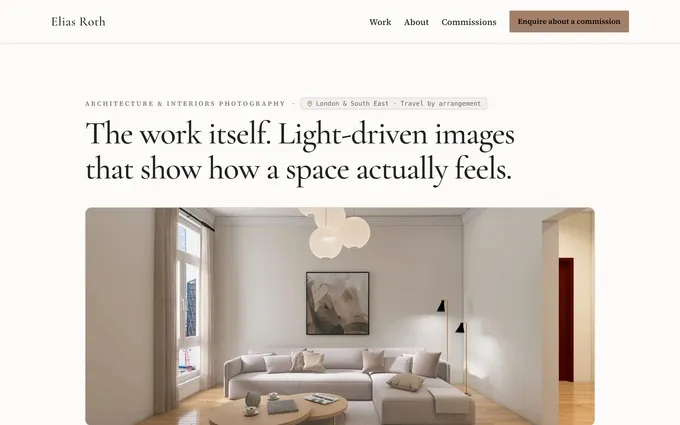
Elias Roth’s home page opens with “The work itself.” over a full-width interior. Selected projects follow, with pages for Work, About, Commissions and Contact. The owner said in the chat where each photo should go and never opened an editor.
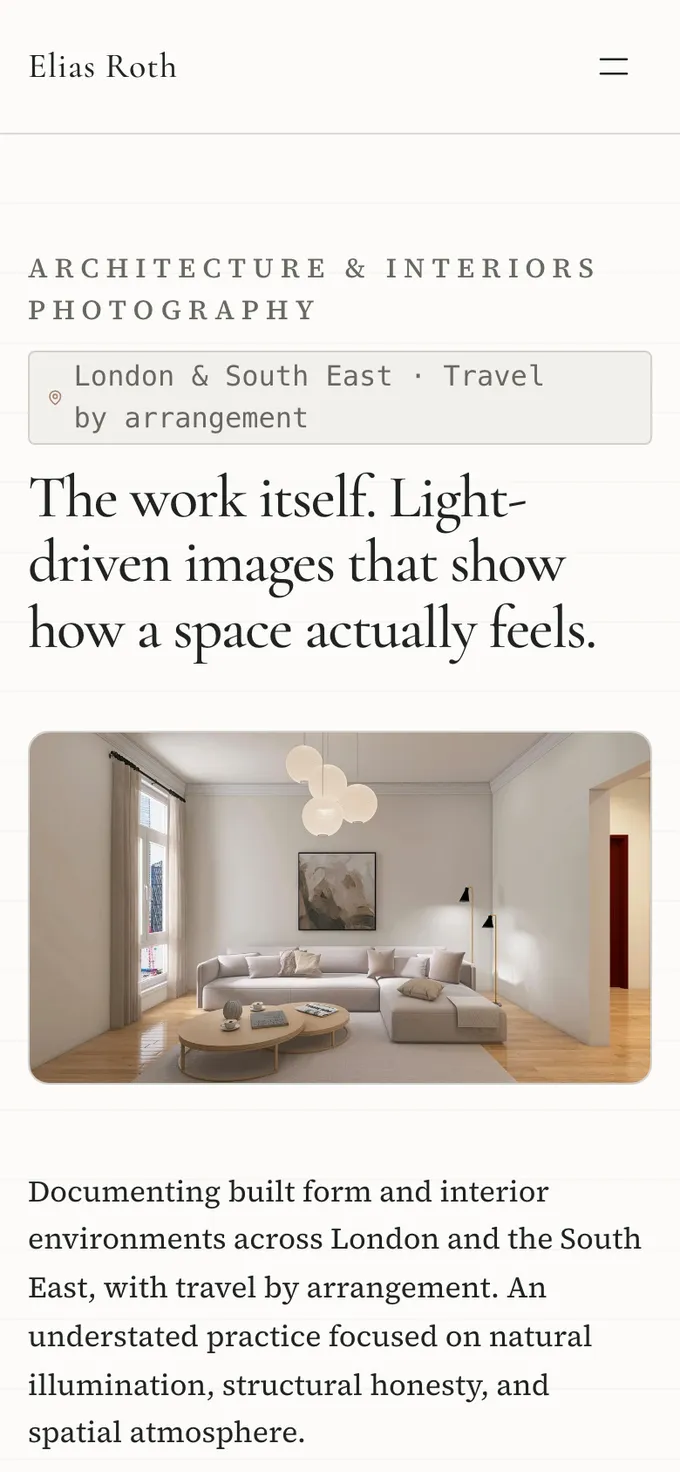
Elias Roth’s home page also works on a phone. SiteSpin sizes photos to fit the screen and keeps text from shifting as the page loads. It checks accessibility on every page and looks at the home page on a phone and a computer, fixing anything that doesn’t read well before you see it.
SiteSpin sets up your website so search engines and AI assistants can read what you photograph, where you work and what you offer. That doesn’t guarantee search rankings or new clients.
Inquiries and sessions in one app
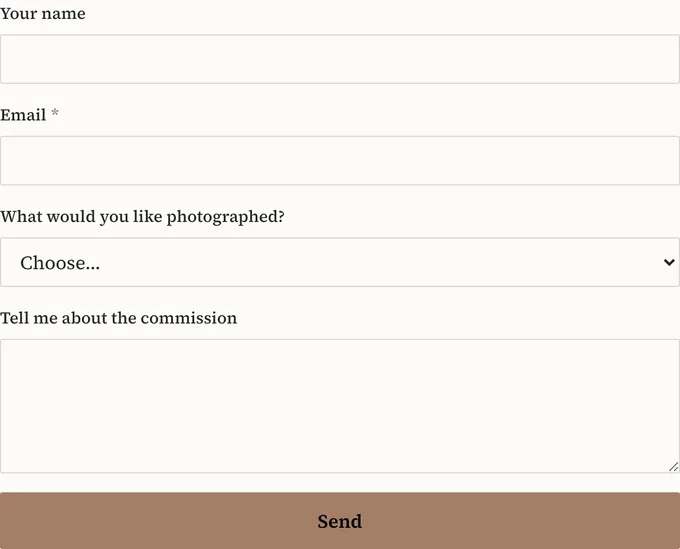
SiteSpin builds forms that ask clients what you need to know. Elias Roth’s form asks what the client wants photographed, with choices for Architecture, Interiors, Hospitality and Something else, followed by “Tell me about the commission”. You get details about the job along with the client’s name and email address.
Every inquiry lands in Messages, marked new, replied or archived. You reply in the app as your business, and the client’s answer comes back to the same conversation. SiteSpin reminds you when a message is waiting, so you can answer between jobs.

For portrait, family or headshot sessions, SiteSpin sets up your prices, session lengths and availability. You choose whether bookings are confirmed right away or need your approval. Clients get confirmations and reminders before the session, and can reschedule or cancel within your rules.
In the app, you can view bookings by day or month, confirm a request from a notification or offer other times. Your schedule also appears in your calendar app, and clients get a calendar file with every confirmation.
Online payment can be optional or required to confirm a session, or left off for a service. Your Stripe account takes the payment. SiteSpin adds no transaction fee of its own; the payment provider’s card fees apply. See how a website with online bookings works.
Elias Roth takes inquiries about commissions. Once you’ve agreed on a job, ask SiteSpin for a payment link to send the client. It opens a secure payment page on your website.
You can sell prints and downloads on the same website. Ask SiteSpin to add a print with its sizes and price, or a digital download. Customers choose and pay on your website. Orders appear in the app alongside your bookings and messages.
Bookings, orders and messages arrive in one app on iPhone and iPad, with the same account and conversation in the browser. In Visitors, you can see how people found your website, which pages they viewed and what those visits led to: messages, bookings, orders and revenue. The statistics work without analytics cookies.
Keeping the portfolio current from your phone
Send photos straight from your camera roll in the chat. SiteSpin keeps them in one library and describes them, so you can ask for “the staircase photo” to lead without hunting for a file name.
For Elias Roth, you might ask:
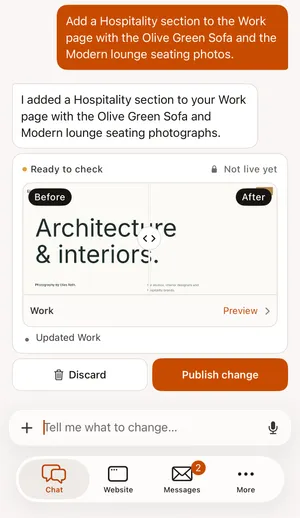
“Add a Hospitality section to the Work page with the Olive Green Sofa and the Modern lounge seating photos.”
Type or say what you want to change, and SiteSpin does it. A larger change, like a new look or a new section, waits for your review. You see the before and after and choose whether to publish it or keep what you have. Earlier versions are saved so you can go back.
You can use the same chat for more than portfolio updates. Tell SiteSpin about a recent shoot and send a photo, and it writes a blog post. Ask to add a product, update a session price or close bookings for a day. Tell it “always lead with interiors” and it remembers until you take that instruction back.
SiteSpin looks after hosting and security and keeps checking that your website is up. Forms have spam protection without puzzles for visitors, and a privacy notice appears where your website collects details.
What other photography website builders leave you to do
With SiteSpin, you describe your business, send photos and ask for changes. Here’s what you handle with the other builders, based on their own pages read in October and November 2026.
Pixieset has client galleries for photo delivery and a drag-and-drop website builder where you arrange desktop and mobile layouts. Bookings come through Studio Manager, a separate product; Pixieset also sells the products together as a Suite. On a paid plan, you can use your own domain name.
Squarespace has photography layouts where you set a photo’s focal point and it crops versions for each device, plus a store for prints. Bookings use a separate Acuity subscription, managed in Acuity’s app or on a computer. The Squarespace app can change block content but cannot add or rearrange blocks; the Squarespace comparison covers the everyday work.
Wix has photo layouts, watermarks, print fulfillment and scheduling with payments. Its AI can shape a first version of your portfolio, but Wix’s AI assistant, Aria, works only on the desktop view. You edit the mobile view by hand, review the AI’s changes and set up bookings in the editor; the Wix comparison explains the steps.
Format has 90+ themes and an editor with thousands of design choices, plus branded client galleries and contracts. You fulfill its store’s orders yourself, and its Pro and Pro Plus plans include a domain for the first year.
With Showit, you design the phone and desktop layouts separately in a drag-and-drop editor. Its blog runs on WordPress, and you choose a shopping cart and add calendars or other tools from other services. You connect your existing domain to Showit.
SiteSpin designs your website, sets up what your business needs and makes changes when you ask. For other types of businesses, see the best website builder for a small business.
What does a photography website cost?
SiteSpin builds the website, sets up bookings and the shop, and makes later changes. A complete business setup includes the website, bookings with online payment, a shop, messages, a blog, visitor statistics and a domain. You also need to be able to update the website and manage bookings and orders from your phone.
In October 2026, those complete setups cost:
- Wix Core with its bookings and shop: about $29 a month. You edit the mobile view, set up bookings and update your portfolio yourself.
- Squarespace Basic with Acuity Standard: about $46 a month, plus 2% of shop sales on Basic. You get the website and scheduling through separate subscriptions.
A typical freelancer charges $2,000 to $7,600 to build a small business website, according to WebsiteSetup. That setup fee is separate from the tools.
SiteSpin is $28 a month, with everything above included: the website built for you, bookings, shop, online payment, inbox, blog, visitor statistics and changes by asking. Wix and Squarespace include a domain for the first year only; renewing it is a separate bill. SiteSpin includes a custom domain, renewed for you automatically.
See pricing for the plan, what a domain costs for the renewal question, and the full website budget for the other routes.
Who makes SiteSpin
SiteSpin is an independent company in Stockholm, Sweden, built by a small business for small businesses. It is self-funded, with no outside investors.
SiteSpin has been on the App Store since May 11, 2026. It has built 1,000+ websites for businesses in at least 18 countries. The app, chat and websites work in 14 languages. If you run more than one business, SiteSpin has plans with more websites.
Start with what you photograph
Tell SiteSpin what you photograph and who your clients are. Say what you want visitors to do, and send your photos. It builds your website with the inquiry forms, session bookings or shop you need, then makes changes when you ask from your phone. If you already have a website, SiteSpin can bring its content across. For help getting started, see how to make a website for your small business.
Start your website. New to SiteSpin? Your first 7 days are free, and nothing is charged until they end.
SiteSpin does not offer private client galleries or proofing, and it has no print lab to print and ship orders. It is not for custom software, accounting or a full set of advanced tools for running an online store.
Common questions
What website do most photographers use?
There is no single answer. Squarespace, Wix, Pixieset, Format and Showit all sell to photographers. SiteSpin builds your portfolio and brings inquiries, bookings and orders into one app, and you ask for changes from your phone.
Is Wix or Squarespace better for photographers?
Wix includes scheduling and payments, while Squarespace takes bookings through a separate Acuity subscription. Wix's AI assistant works on the desktop view, and the Squarespace app cannot add or rearrange page blocks. SiteSpin builds your portfolio with the business tools you need, then makes changes when you ask from your phone.
Can SiteSpin deliver client galleries and proofing?
SiteSpin does not deliver private client galleries or proofing. You can link to a gallery service from your SiteSpin website. Clients can see your work, send an inquiry or book a session on your website.
Can clients book and pay for a photo session?
Yes. SiteSpin sets up sessions with prices, session lengths, confirmations and reminders, and clients can reschedule or cancel within your rules. Online payment can be required to confirm.
Can I update my photography website from my phone?
Yes. Send photos from your camera roll and ask SiteSpin to add a page, rearrange photos or update a price. SiteSpin shows you the before and after for a new look and keeps earlier versions.
Sources
- Pixieset, Client Gallery, read
- Pixieset, Website, read
- Pixieset, Website pricing, read
- Pixieset, Studio Manager, read
- Squarespace, Create a photography website, read
- Squarespace Help Center, Adding online booking to your site, read
- Squarespace Help Center, Edit your site with the Squarespace app, read
- Squarespace, Squarespace pricing, read
- Acuity Scheduling, Acuity Scheduling pricing, read
- Wix, Photography portfolio website, read
- Wix Help Center, Wix Harmony Editor: Working with Aria, read
- Wix, Wix Premium plans, read
- Format, Format, read
- Format, Format pricing, read
- Showit, Showit, read
- Showit Learn, Mobile vs desktop design, read
- WebsiteSetup, Small business website costs (what to expect in 2026), read
- SiteSpin, SiteSpin pricing, read