
Guides
Is Google Sites free? What a small business still needs
Yes, Google Sites is free with a personal Google account, shows no ads and suits information pages. A domain costs extra, Calendar reminders and paid bookings need a subscription, a shop needs another service, and website changes need a computer. SiteSpin builds the website with bookings, a shop and messages together, then makes changes you ask for from your phone.
By SiteSpin Published Last verified
Yes, Google Sites is free with a personal Google account and works for information pages. If you want clients to book and pay, SiteSpin builds the website with those tools working together, then makes changes you ask for from your phone. With Google Sites, writing the pages, choosing business tools, buying an address and keeping everything current stay with you.

Is Google Sites really free?
Google Sites is free with a personal Google account; a Google Workspace subscription is optional. The live Google Sites checked for this guide showed no ads, though Google’s Report abuse and Page details controls and its cookie notice were present.
Google publishes no price for Sites on a personal account and makes no promise that it will stay free permanently.
Your website and the content you add count toward your Google Drive storage allowance. A free account includes 15 GB.
Google Workspace’s US business plans include Sites. You still buy and connect a domain, arrange Calendar bookings and Forms, and choose a separate service for a shop. Business Starter keeps the basic Calendar booking page.
SiteSpin takes on the setup too: it writes the pages, arranges the business tools and makes later changes when you say what changed.
What can you do with Google Sites?
You can publish information pages with Google’s templates and themes, your colors, fonts and logo. Add Docs, Slides, Sheets, Forms, Calendar and Maps, and invite other Google accounts to change the pages together.
Google still maintains the current product. An update announced on October 19, 2026 lets people publish apps from Gemini to Google Sites; the retired version was Classic Google Sites.
The next job is making those pages useful when a visitor wants to book, buy or get in touch. If you are considering building a business website with ChatGPT, compare the bookings, payments and later changes too.
Can you use Google Sites for a business?
Yes, Google explicitly allows “personal or business use.” SiteSpin sets up the website and its business tools from your description; with Google Sites, you arrange the pages and the services around them. Compare SiteSpin and Google Sites for bookings, messages and changes from your phone.
An address customers can recognize
SiteSpin includes a custom domain, renewed for you automatically.
Google Sites includes no domain. You buy an address, verify that you control it, then change settings at your domain provider to connect it. Google requires an address with a prefix such as www, and only the website’s owner can connect it. Changes can take 24 to 48 hours.
Bookings and reminders
With SiteSpin, clients choose a service and an available time, and reminders go out before the appointment.
For Google Sites, you add a Google Calendar booking page. A personal account or Workspace Business Starter gets “a single booking page.” Reminders and paid appointments need a subscription with premium Calendar appointment features.
Taking payment
SiteSpin lets clients pay for bookings and customers pay for orders through your Stripe account. You handle refunds, disputes and statements in the app. SiteSpin adds no transaction fee of its own; card processing fees apply.
Google Calendar’s paid appointments also use Stripe, accepting cards, Apple Pay or Google Pay. Google Calendar does not assist with payment or refund issues; you issue refunds in Stripe.
Selling products
Ask SiteSpin to add a product with its photo, price and options, and customers can order from the website.
Google’s Sites help documents no built-in shop, cart or checkout. Selling products means arranging a separate service.
Receiving and answering messages
With SiteSpin, messages arrive beside bookings and orders, ready for you to reply as the business.
A Google Sites contact form uses Google Forms. Responses stay in the form or a linked Google Sheet, with optional email notifications; you handle those responses separately.
Being found and seeing visits
Your pages set out what you offer, where you are and when you’re open, so search engines and AI assistants can read them. The app shows visits and the bookings, orders and messages they led to.
With Google Sites, you can connect Google Analytics to see visits. Google documents no separate search description for each page and no blog. Its documented search visibility control lets you ask search engines to leave the website out of results.
Changes from your phone
Tell SiteSpin, for example, “I’m closed on Friday,” and it changes the relevant hours from your phone.
Google says that to change the website, “you must use a computer.” You can view Google Sites on a phone or tablet.
What do free and paid plans cover?
SiteSpin builds the website and sets up the business tools together. Paid Google plans can add Calendar features, while the pages and connections remain yours to arrange.
The paid Google column means a subscription with premium Calendar appointment features. Business Starter keeps the basic booking page.
| What you need | Google Sites, free | With paid Google plans | SiteSpin |
|---|---|---|---|
| The website | You build the pages | You build the pages | Built from your chat |
| A domain | Buy and connect | Buy and connect | A custom domain, renewed for you automatically |
| Bookings with reminders | Basic page; no reminders | Set up premium Calendar | Services and reminders set up |
| Taking payment | Arrange another service | Connect Calendar to Stripe | Bookings and orders |
| A shop | Arrange separately | Arrange separately | Add products by asking |
| Messages | Forms or Sheets | Forms or Sheets | Inbox and replies |
| Search setup | Limited controls | Same Sites controls | Pages describe the business |
| Changes from a phone | Computer required | Computer required | Ask from your phone |
| Monthly cost | Free pages; extras vary | Plan, domain and extras | Complete plan below |
Which is better, Wix or Google Sites?
Wix puts scheduling and selling in paid plans that support payments; Google Sites gives you free information pages and leaves the business tools to you. Wix’s free plan has Wix branding and a wixsite.com address, without online selling or payment collection.
With Google Sites, you build and maintain the pages. SiteSpin does that work from your description, then makes later changes you ask for from your phone. Compare SiteSpin and Wix for setup and changes from your phone.
How SiteSpin builds the website and helps you run the day
SiteSpin builds your website with bookings, a shop, messages or a blog, then makes changes you ask for from your phone. It is the easiest way to get a small business online.
Mara Chen Strength is a SiteSpin example business, a personal trainer in Austin, Texas. Its first message was:
I’m a personal trainer in Austin. I run small strength classes of six and one-to-one sessions, and I need a website where people can book.
SiteSpin asks a few focused questions, one at a time. You can talk instead of typing and send photos from your camera. It plans the pages, writes the words from what you tell it and offers three designs to choose from. SiteSpin builds your website in minutes and checks how it reads on a phone and a computer before you see it.
On the example website pictured above, clients see services and prices, choose Book now or send a message.
Your booking day, ready in the app
You describe your sessions, prices, durations and availability; SiteSpin sets them up. Choose instant confirmation or your approval, and let clients move or cancel within your rules. Reminders go out before appointments.
Bookings arrive in the app, with the day laid out. You can confirm a request from its notification or offer another time.
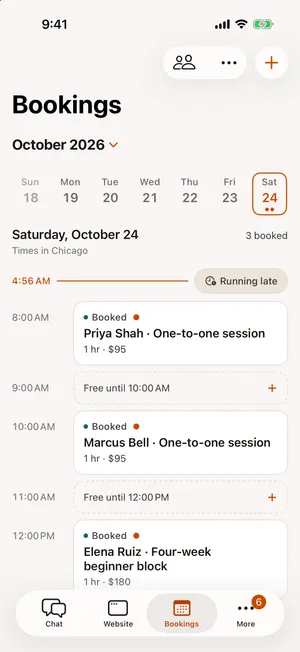
Running late? Tell SiteSpin, and it can move the later bookings or let those clients know. You carry on providing the service.
Change services between appointments
Services behind Book now show prices and durations in the app.
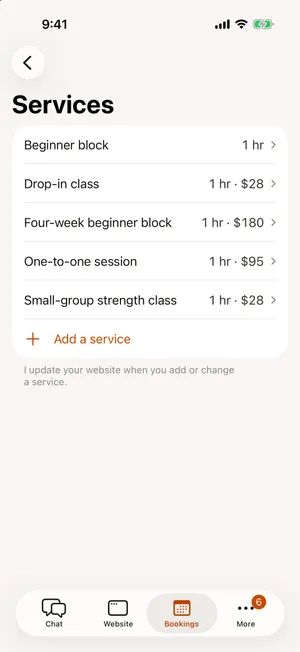
Say, for example, “Close bookings on Friday” or “Add a small-group class on Saturday.” SiteSpin changes the setup from your phone. Classes can have places and a waiting list; staff can have their own services and availability. Change a price, and it reaches the pages where it belongs.
Products, messages and news in the same place
For example, a trainer selling a downloadable plan can ask SiteSpin to add it with a price and photo. The shop sends the digital file once paid. Physical products can have sizes, options and delivery details.
Messages arrive in the same app as bookings and orders. Reply from the inbox as your business, and the customer’s answer returns to that conversation.
Tell SiteSpin your news and it becomes a blog post with a photo. Ask for a new page or a new look too; a new look is shown before and after, and you choose whether to publish it. Earlier versions are kept.
The website is looked after too
SiteSpin keeps the website online and checks that it stays available. It handles security, spam protection and a privacy notice where the website collects details.
Visitor statistics show the pages people read and the bookings, orders and messages those visits led to, without analytics cookies. Payments and payouts appear there too.
Use SiteSpin on iPhone and iPad, or continue with the same account and conversation in the browser.
What does a complete business setup cost?
With SiteSpin, building the website, setting up its business tools and making later changes are included. Compare what a small business website costs, including a business address, bookings with online payment, messages, visitor statistics and a way to keep it current.
Wix Core, with its own bookings and shop, is about $29 a month (Wix’s plans page, read October 2026). SiteSpin costs $28 a month, including the website built for you, bookings, a shop, messages and changes by chat. With Wix at about the same price, you arrange the pages and set up bookings and the shop yourself. Wix includes a domain for the first year only; renewing it is a separate bill. SiteSpin includes a custom domain, renewed for you automatically.
With Google Workspace, buying and connecting the domain, arranging Calendar and Forms, and choosing any separate selling service remain your jobs.
Setup help is a separate cost. WebsiteSetup, updated November 22, 2025 and read October 24, 2026, gives a range of $2,000 to $7,600 for a small-business website built by a freelancer, before tool subscriptions. Doing it yourself means spending your own time writing, building and connecting the parts.
SiteSpin Pro is $28 a month, with everything above included: the website built for you, bookings, a shop, online payment, messages and replies, a blog and visitor statistics. It includes a custom domain, renewed for you automatically, and changes by chat.
New to SiteSpin? Your first 7 days are free, and nothing is charged until they end. Start with SiteSpin and tell it what you do.
SiteSpin does not build custom apps, accounting systems or the systems needed to run a large company or a complex retail operation.
Common questions
Is Google Sites 100% free?
Yes, publishing with a personal Google account is free, and the live Google Sites checked for this guide showed no ads. A domain costs extra; Calendar reminders and paid appointments need a subscription with premium appointment features. Google makes no promise of permanent free pricing.
Does Google Sites give you a free domain?
No, you buy a domain separately, verify that you control it and connect it through your domain provider's settings.
Can you use Google Sites for a business?
Yes, Google explicitly allows business use. You arrange bookings through Calendar, collect messages in Forms or Sheets, and use a separate service to sell products. SiteSpin builds the website with those tools working together and brings bookings, orders and messages into one app.
Which is better, Wix or Google Sites?
Wix puts scheduling and selling in paid plans that support payments; Google Sites gives you free information pages and leaves the business tools to you. With Google Sites, you build and maintain the pages. SiteSpin builds the website and sets up the business tools from your description, then makes changes you ask for from your phone.
Is Google Sites still a thing?
Yes, Google still maintains the current Google Sites and announced an update on October 19, 2026 for publishing apps from Gemini to Sites. The retired product was Classic Google Sites.
Sources
- Google Workspace Updates, Publish interactive apps from the Gemini app to Google Sites, read
- Google Sites Help, Create, name, delete, or copy a site, read
- Google Sites Help, What you need to use Google Sites, read
- Google Sites Help, Use a custom domain for your site, read
- Google Sites Help, Publish & share your site, read
- Google Sites Help, Add, delete & organize pages, read
- Google Sites Help, Add Google files, videos, calendars, maps and more, read
- Google Calendar Help, Compare premium features for appointment schedules, read
- Google Calendar Help, Learn about appointment schedules, read
- Google Calendar Help, Require payments for appointments, read
- Google Calendar Help, Share your appointment schedule, read
- Google Docs Editors Help, Choose where to save form responses, read
- Google, Google Workspace pricing, read
- Google Drive Help, Files you can store in Google Drive, read
- Wix, Is Wix really free?, read
- Wix, Wix Premium plans, read