
Guides
How to sell on Instagram with a website shop
To sell on Instagram in 2026, use Instagram to be found and your website to be paid. Shops have used website checkout since September 2025. Start with a professional account, a website shop, product tags, a bio link and payment links for DMs. SiteSpin builds the website and shop so customers can choose a size and pay. Orders arrive in your app.
By SiteSpin Published Last verified
Give customers a place to choose and pay
To sell on Instagram, use a professional account to show your products and a website shop where customers choose and pay. Meta moved Shops to website checkout in September 2025, so advice about paying inside an Instagram Shop is out of date. A shop keeps sizes, colors and paid orders out of scattered DMs. Send buyers there through your bio link, payment links and, once your Shop is approved, product tags.
SiteSpin is the easiest way to get that website and shop built. Tell it what you sell and answer a few questions. SiteSpin then builds your website in minutes, preparing the pages, words, design and shop for your business. Later, you can add a product, change a price or ask for a payment link from your phone. See when to add a website alongside Instagram.
Switch to a professional account
For an Instagram Shop, use an Instagram business account and add it to your Meta business portfolio. A business account is a professional account. If you’re selling only on Instagram, Meta says you don’t need a Facebook business Page to create the Shop.
Give your products a home with checkout
Tell SiteSpin what you make, who buys it and how you want them to order. It plans the pages, writes the words and prepares designs for you to choose from. The shop and contact form come with the website.
Before you see it, SiteSpin checks your home page on a phone and computer and fixes what reads wrong. The pages are designed to load quickly and read clearly on a phone.
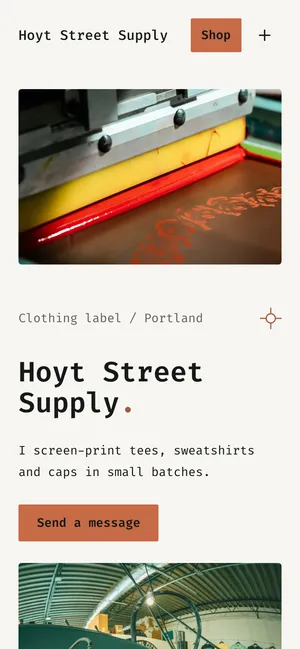
For this guide, we built Hoyt Street Supply, an example clothing label in Portland, Oregon. All payments shown here use Stripe’s test mode. The owner’s opening message was:
I run a small clothing label in Portland. I screen-print tees, sweatshirts and caps in small batches and sell them mostly through Instagram DMs, and I want people to pick a size and pay on my own website instead.
SiteSpin built the website with a shop and contact form from that conversation.
You provide the product details and fulfill orders; customers pay through your own Stripe account. The website gives them somewhere to choose what they want and pay without you collecting each detail in a conversation.
Show sizes, shipping and returns
Give buyers the details they need before they order. Tell SiteSpin your delivery charge and return terms, and ask it to put them on the website. Meta requires refund and return policies to be clearly displayed and easy to reach.
Selling clothes: sizes, colors and restocks
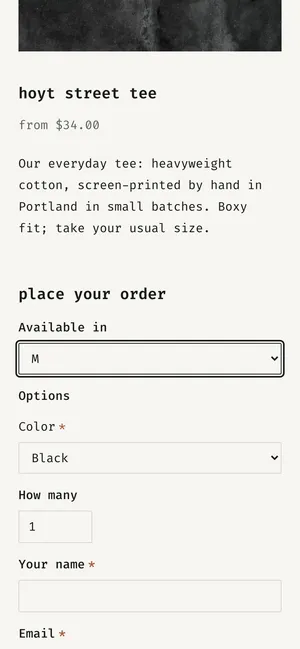
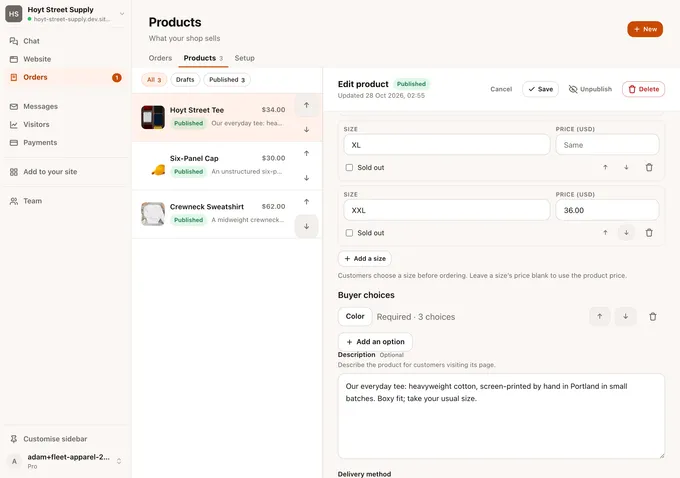
In Hoyt Street’s shop, the tee costs $34 in S through XL and $36 in XXL. Color is a required choice: White, Black or Sand. Customers choose on the product page, and the order form asks for a delivery address.
The example customer picked M and Black. With $6 delivery, the total was $40.
In the app, each size has its own price and a Sold out box. When a size sells out, mark it there. For a restock or a new product, tell SiteSpin what changed from your phone.
Photos can come from your phone too. For this example, we sent printing photos in the chat. We asked SiteSpin to put the red-ink photo at the top of the home page and the press photo beside the story of printing in small batches. SiteSpin placed and published them.
Set up your Instagram Shop in Commerce Manager
Your website is where the sale finishes. Your Instagram Shop gives people a way to browse products and follow tags to buy them.
Meta’s Shop setup happens in Commerce Manager. The main jobs are:
- Create the Shop and choose your commerce platform, or select “I don’t use these platforms.”
- Connect your Instagram business account and add your product catalog. A commerce account can link to a single catalog.
- Set up a shipping profile with at least one shipping speed.
- Add the checkout URL, the website address that takes buyers from Instagram to checkout. Meta requires it for the Shop to be visible, and products must be available to buy directly from your website through a single, non-shortened domain.
- Provide a contact email, a return window in days, a returns page address and a privacy policy page address. Agree to the Seller Agreement and submit for review.
Meta’s review can take up to 4 weeks. Use your bio link and payment links while you wait.
Approval also depends on Meta’s commerce eligibility requirements: following its policies, representing your business and domain accurately, being in a supported country, and having an authentic, established presence. Meta says this may include a sufficient follower base.
Where Instagram Shops are available
According to Meta’s supported-country list, the full Shops experience is available in the United States, excluding US territories.
Canada, Brazil, Mexico, Denmark, France, Germany, Italy, the Netherlands, Norway, Spain, Sweden, Switzerland, the United Kingdom, Australia, India, Japan, Korea, Singapore, Taiwan and Thailand are in open beta. Some sellers in those countries may not have full capabilities.
These Meta requirements and availability details were checked October 28, 2026.
Tag products in posts, Reels and Stories
Product tags point people from the content they like toward the product they can buy on your website. Once your Shop is approved, use the catalog products in the tagging options available to your account.
The limits in Meta’s current instructions are:
- Photo posts and carousels: up to 20 product and shop tags in a photo post, or 20 across the whole carousel.
- Reels: Meta says adding products to a Reel applies only to legacy Shop catalogs. If that option isn’t available to you, point viewers to your bio link.
- Stories: one product sticker per Story, with up to 5 tagged products.
See Meta’s instructions for post and Reel tags and Story product stickers. A product tag helps someone find the item; payment still happens on your website.
Link your shop from your bio and Stories
Put a direct shop link in your profile so someone who likes a tee can find it without sending you a message. Label it “Shop” so buyers can spot it.
SiteSpin can also build a link-in-bio page for your social profiles. Use it when you want to offer a choice, such as the shop, a new collection and your contact details.
In a Story, use a link sticker to send people to your website. Show the garment, name it and give the viewer a clear next step to buy it.
Answer DMs with a payment link
Keep the conversation for questions about fit, color or delivery. Once you’ve agreed what the customer wants, send a payment link.
In the Hoyt Street example, the owner used SiteSpin’s chat to request a payment link for a Crewneck Sweatshirt in L, Natural. The request totaled $68: $62 for the sweatshirt and $6 delivery. SiteSpin supplied the link with a Copy link button.
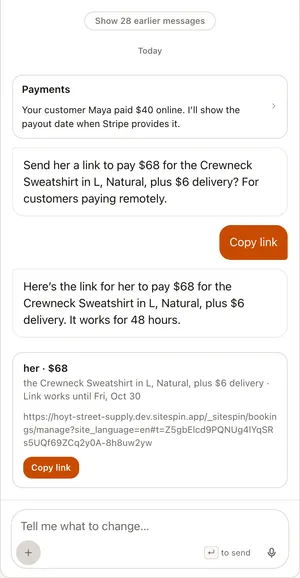
Copy it into the Instagram conversation. The customer opens a payment page on your website and pays there. SiteSpin’s payment links work for 48 hours.
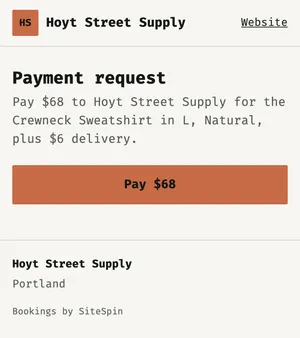
For payments without a full shop, Stripe also lets you share a payment link in a message. The link opens a payment page hosted by Stripe. With SiteSpin, ask in the chat for a payment link that opens on your business’s website.
See what sells and handle orders from your phone
When the example customer’s tee payment succeeded, the website confirmed that the order was paid and an email confirmation was on its way. In the owner’s app, Maya Lopez’s order appeared as Paid online, totaling $40.
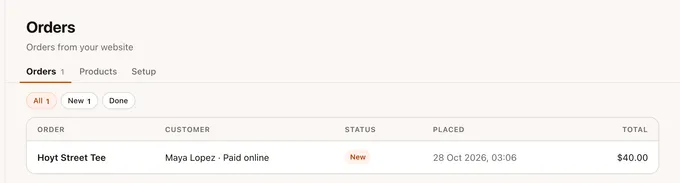
Website messages arrive alongside orders in the app. You can reply as your business, and the customer’s answer comes back to the same conversation.
In Visitors, see where visitors came from, the top pages, and the orders and money those visits led to. Use that view to understand what happens after someone reaches your shop.
The website can support more of the business as it grows. You can add bookings for a workshop, with class places and reminders. Tell SiteSpin your news, and it becomes a blog post with a photo. You can change products, posts, prices and pages by asking from your phone.
What it costs to sell this way
SiteSpin builds the website, sets up the shop and makes later changes when you ask. Orders, website messages and visitor statistics work together, so you can run the shop from your phone.
Hosting and spam protection are handled too. SiteSpin adds a privacy notice where your website collects details and keeps checking that your website is up.
If you pay someone to build a small-business website, WebsiteSetup’s published ranges are $2,000 to $7,600 for a freelancer or $5,000 to $15,000 for an agency, before ongoing tools. These are setup costs, read October 24, 2026. SiteSpin costs $28 a month, including the website built for you, hosting, a custom domain that SiteSpin renews automatically, bookings, a shop, messages and changes by chat.
For online payments, Stripe’s US domestic-card fee is 2.9% + 30¢ per successful transaction. SiteSpin adds no transaction fee of its own.
For $28 a month, SiteSpin builds your website and includes the shop, bookings, blog, messages and visitor statistics. Changes you ask for are included. You also get a custom domain, renewed for you automatically.
Start with the products you already sell
New to SiteSpin? Your first 7 days are free, and nothing is charged until they end.
Tell SiteSpin what you sell and how customers order today. It asks a few questions, builds the website and shop, and gives you a place to send the next person who asks for a size and a price.
SiteSpin brings a small-business website, shop, bookings and messages together. It isn't an advanced commerce operations suite, accounting system or bespoke business software.
Common questions
Can you sell on Instagram without a website?
Yes. Stripe lets you share a payment link in a DM without a digital storefront; the payment page is hosted by Stripe. An Instagram Shop still needs products available to buy directly from your website, which SiteSpin builds with a shop and checkout.
Does Instagram take a fee on sales?
Instagram no longer processes purchases through Shops; customers pay on the seller's website. For SiteSpin orders, Stripe's payment-processing fees apply, and SiteSpin adds no transaction fee of its own.
How do I get an Instagram Shop?
Use an Instagram business account, put your products for sale on your website, and create a Shop in Commerce Manager with a catalog, shipping details and a checkout URL. Meta reviews it against its commerce eligibility requirements, including your location and an established presence.
Can customers pay in Instagram DMs?
We could not confirm from Meta's current documentation that US businesses can take payment inside Instagram DMs. You can send a payment link there today; with SiteSpin, ask in the chat for the link and the customer pays on your website.
How do I sell clothes on Instagram?
Give each garment clear photos, sizes, colors, delivery details and an accessible returns policy, then link or tag it from Instagram. In SiteSpin's shop, customers choose a size and color, and you can mark sizes Sold out. Paid orders arrive in your app.